GuardPoint10 - Stunnel Configuration for Secure Tunnel Endpoints
New VMS Company Setup
GuardPoint 10 must be externally accessible to use the SensorVMS.com interface.
A secure mutually authenticated channel (much like a VPN) must be established. In the scenario below, TLSv1.2 or TLS1.3 are used establish these protected links:
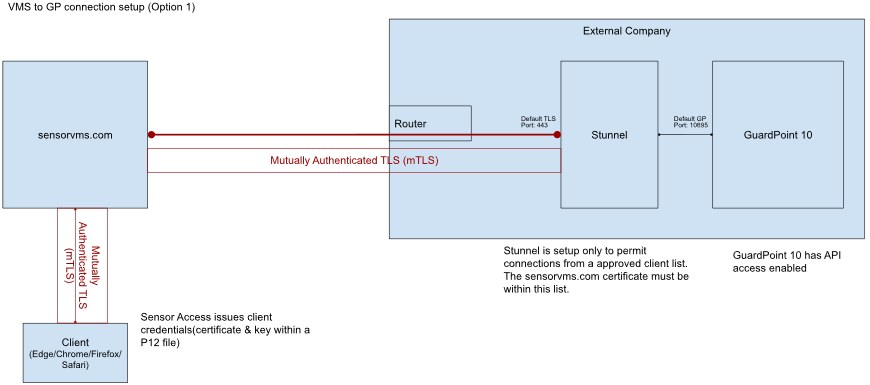
The third party software entitled Stunnel is used to maintain the external companies secure tunnel end-point.
Stunnel is configured by editing the text file ‘stunnel.conf’.
The following configuration is used in the scenario above:
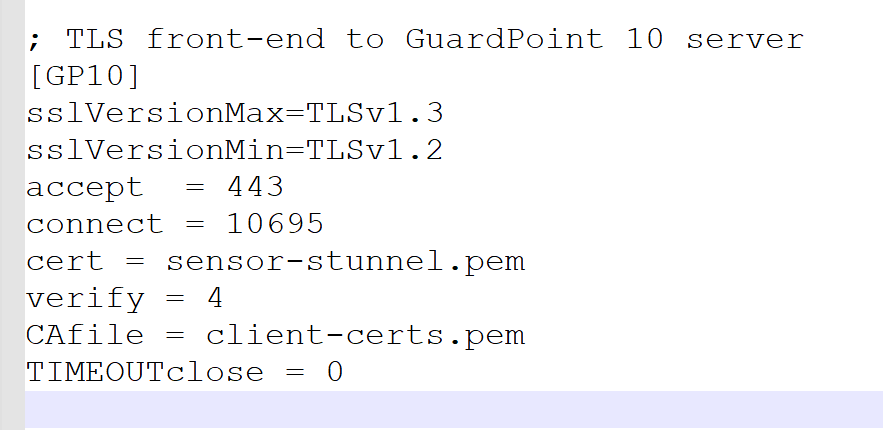
You have a choice of 5 different ‘verify’ modes with Stunnel.
> level 0 - request and ignore peer certificate
> level 1 - verify peer certificate if present
> level 2 - verify peer certificate
> level 3 - verify peer with locally installed certificate
> level 4 - ignore CA chain and only verify peer certificate
> default - no verify
Level 4 has been chosen, meaning we must have a copy of sensorvms’s certificate within the CAFile(client-certs.pem)
Was this article helpful?
That’s Great!
Thank you for your feedback
Sorry! We couldn't be helpful
Thank you for your feedback
Feedback sent
We appreciate your effort and will try to fix the article