Short Installer Guide
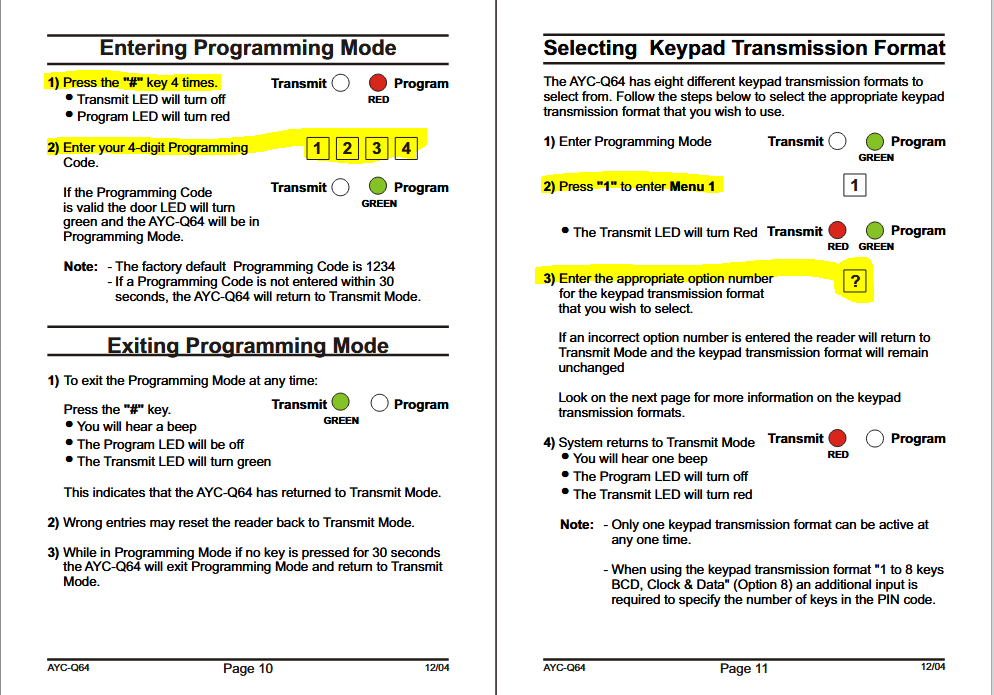
To use PINs on a Rosslare AYC-Q64 with GuardPoint10, the reader must be set to the correct keypad transmission format. If the wrong format is used, GP10 receives the wrong value and will deny the PIN.
Required setting:
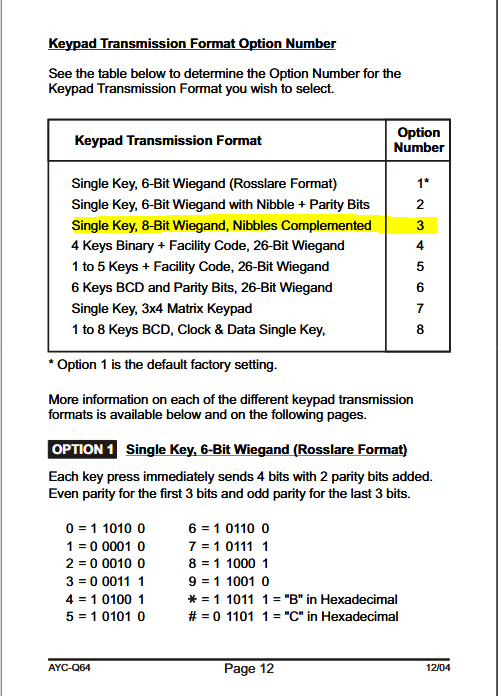
Keypad Transmission Format = Option 3
“Single Key, 8-Bit Wiegand, Nibbles Complemented”
How to set it:
Enter programming mode by pressing #### and entering the programming code (default 1234).
Press 1 to open the keypad format menu.
Press 3 to select Option 3.
Exit programming mode.
Symptoms of incorrect format:
PIN is always denied, even though the card works.
Event log shows unexpected PIN values.
After selecting Option 3, PIN entry works normally with GuardPoint10.
Was this article helpful?
That’s Great!
Thank you for your feedback
Sorry! We couldn't be helpful
Thank you for your feedback
Feedback sent
We appreciate your effort and will try to fix the article