GuardPoint10 Free Commands
Introduction
Free Commands are advanced low-level controller commands within GuardPoint 10 that allow direct communication with access control hardware. They are primarily used for engineering, diagnostics, testing, integration, and specialist automation tasks that go beyond the standard GuardPoint 10 user interface functions.
Unlike normal GuardPoint 10 operations, which rely on predefined menus and workflows, Free Commands send raw hexadecimal command strings directly to a controller. These commands can either be executed manually through the Diagnostic screen or automatically through Global Reflex actions in response to specific system events, such as badge presentations, alarm activity, or input changes.
Intended Audience
Free Commands are intended for experienced GuardPoint engineers, integrators, and technical support personnel who require advanced control of controller behaviour for diagnostics, testing, commissioning, automation, or integration purposes.
Because Free Commands operate at a low level and can directly affect controller operation, they should only be configured or executed by individuals who understand GuardPoint controller communications, hardware behaviour, and the potential impact on a live system. They are not recommended for routine operator use or general day-to-day system administration.
Common Use Cases
Free Commands are commonly used to automate or manually trigger controller actions outside of standard GuardPoint workflows. Typical use cases include simulating badge swipes during testing, triggering virtual access events, activating inputs or relays, resetting controllers, and generating controller activity without physically interacting with field hardware.
They are also useful during commissioning, integration development, diagnostics, and fault-finding, where engineers may need to reproduce controller events or test specific behaviours quickly. In more advanced environments, Free Commands can be incorporated into Global Reflex workflows, custom integrations, or third-party systems to support lift integrations, area tracking, occupancy logic, anti-passback functions, and other advanced automation scenarios where direct controller actions are required beyond standard GuardPoint functionality.
Free commands in Global Reflex
Note: This feature requires the 'Advanced Global Reflex Module on your GP10 licenseThe following Free Commands can be used to simulate different controller events and actions.
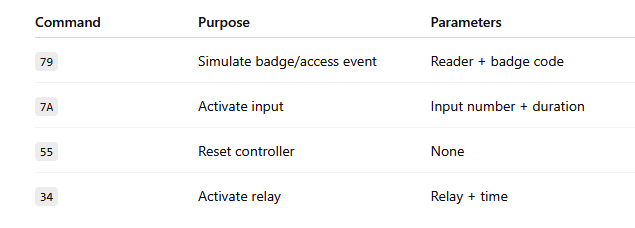
79 : Simulate an Access Event
Command 79 is commonly used within Global Reflex to simulate a badge swipe event on a selected reader for testing access control behaviour, events, and integrations without physically presenting the simulated card.
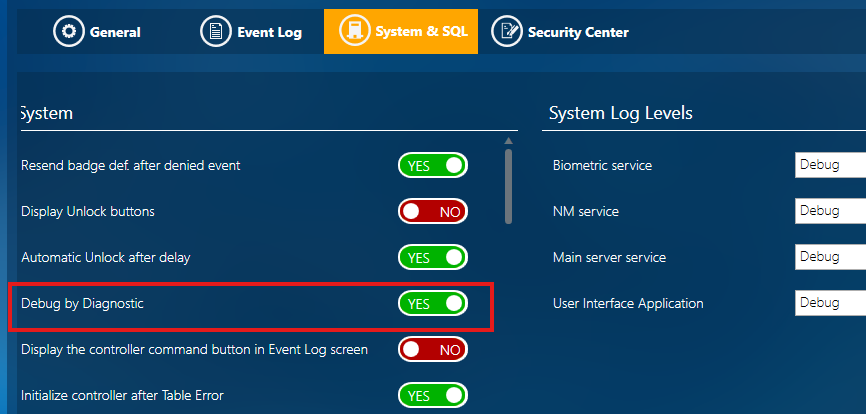
To begin, you will need to turn on 'Debug by Diagnostic' within Options -> System & SQL
Navigate to the Global Reflex tab (Under Setup).
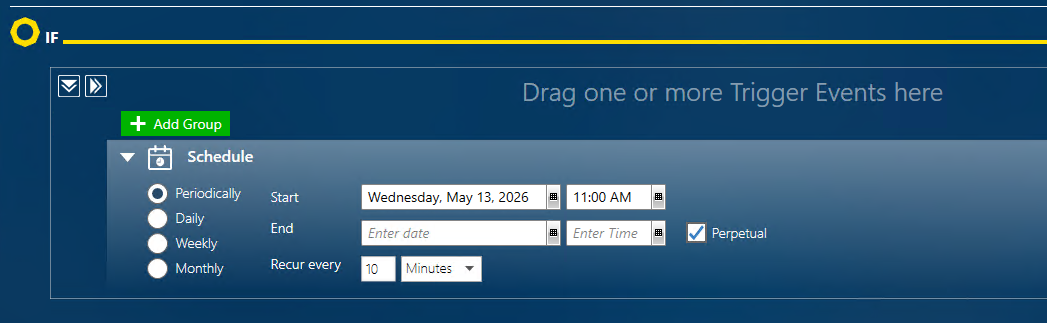
Add your IF condition to define the event that will trigger the Global Reflex action, such as a badge swipe, input activation, alarm event, or scheduled action.
eg. I am going to simulate a badge swipe every 10mins, on reader one, with badge code "3A174160"
Add your THEN statement using the Free Command (Under Other Actions)
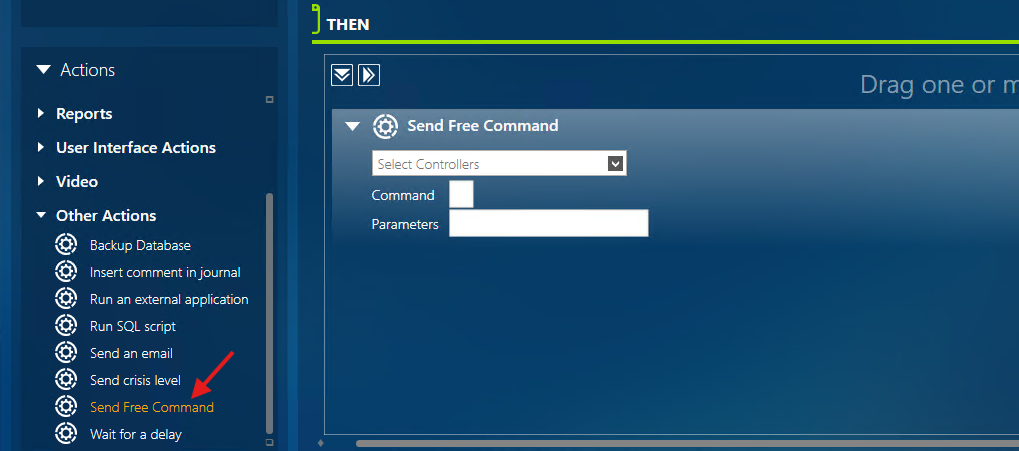
Command: 79
Parameters: reader number e.g "01", "0000" followed by badge code e.g "3A174160"
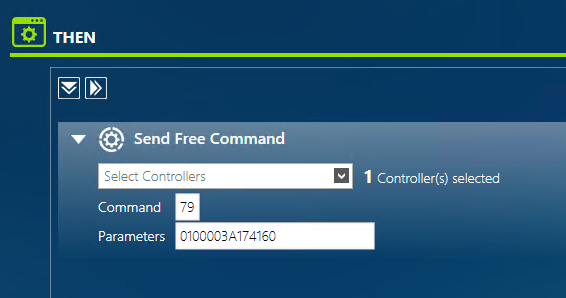
The badge code entered here defines which badge the controller will simulate as being presented at the selected reader when the Global Reflex action is triggered.
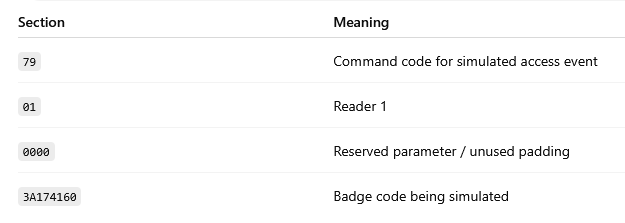
Save your changes. You can use 'Test Actions' to check it's worked.
GuardPoint10 will simulate the configured badge being presented at the selected reader, as shown in the Event History & Event Log tabs:


7A : Activate Input
As above, setup your Global Reflex Action, with the IF condition, follow by the Free Command in the THEN statement
Command: 7A
Parameters: Input number e.g 03, Activation Duration in seconds e.g 03
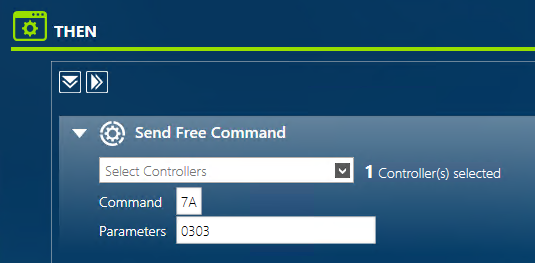
Save changes. Trigger the IF condition. GuardPoint10 will now execute Command 7A and simulate the selected input being activated for the configured duration. This can be checked via the Event History/Log tab as before.
55 : Reset Controller
Command 55 is commonly used within Global Reflex to remotely reset a selected controller for testing, diagnostics, recovery, or automation purposes without physically accessing the controller hardware.
Follow the same steps as above to create your Global Reflex. For this command no parameters are required:
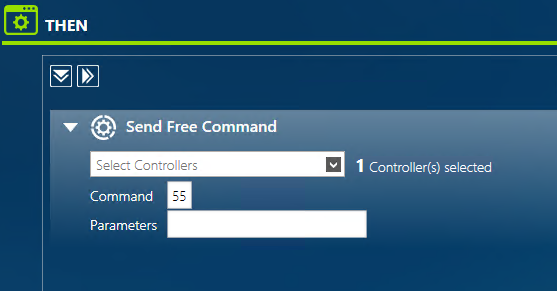
Save changes. Trigger the IF condition. GuardPoint10 will now remotely reset the selected controller.
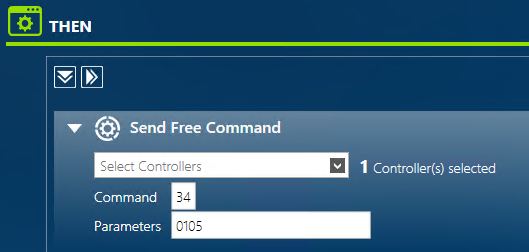
34 : Activate Relay
Command 34 can be used to automate connected hardware actions such as door releases, signalling devices, integrations, or other relay-controlled functions.
Follow the same steps as above to create your Global Reflex.
Command: 34
Parameters: Relay number e.g 01, Activation duration in seconds e.g 05
Free commands via Diagnostic
Free Commands can also be executed manually through the Diagnostics screen for testing, troubleshooting, and engineering purposes. Unlike Global Reflex, which runs commands automatically when a trigger condition occurs, the Diagnostics screen allows engineers to send Free Commands directly to a controller immediately. This is commonly used to test controller behaviour, simulate events, verify integrations, or troubleshoot hardware without configuring automation workflows.
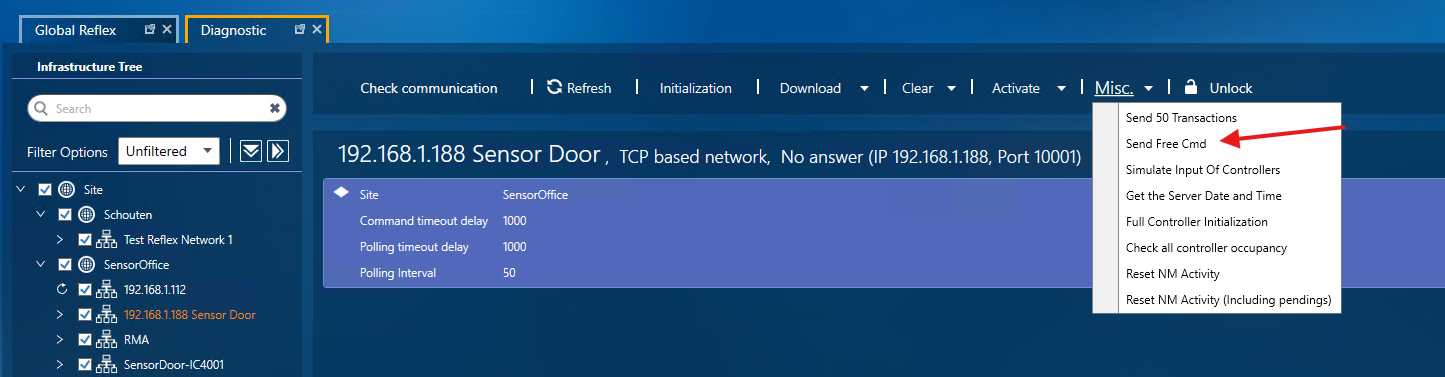
Navigate to the Diagnostics tab (under Setup) and select the relevant Controller from the left hand side. Then choose 'Send Free Cmd' from the 'Misc' dropdown:
Enter the relevant Command and Parameters (where applicable)
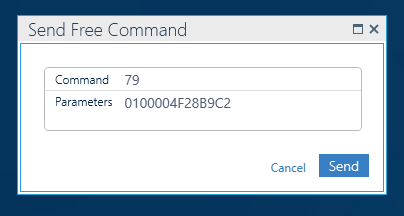
GuardPoint10 will immediately send the command to the selected controller and execute the associated action or simulated event.
Was this article helpful?
That’s Great!
Thank you for your feedback
Sorry! We couldn't be helpful
Thank you for your feedback
Feedback sent
We appreciate your effort and will try to fix the article