Mobile Guard App Guide
Available to download on the Google Play Store:
Click to Download
About Mobile Guard
Working with GuardPoint 10, Mobile Guard turns your Android phone into a portable validation tool, allowing authorised staff to read cards using NFC, scan QR codes, and monitor users in real time anywhere on site.
When a card is read or a QR code is scanned, Mobile Guard displays key user information, including the cardholder’s photo, location, and validation status. This helps staff carry out impromptu spot checks quickly, confidently, and with the information they need at hand.
Key Functions
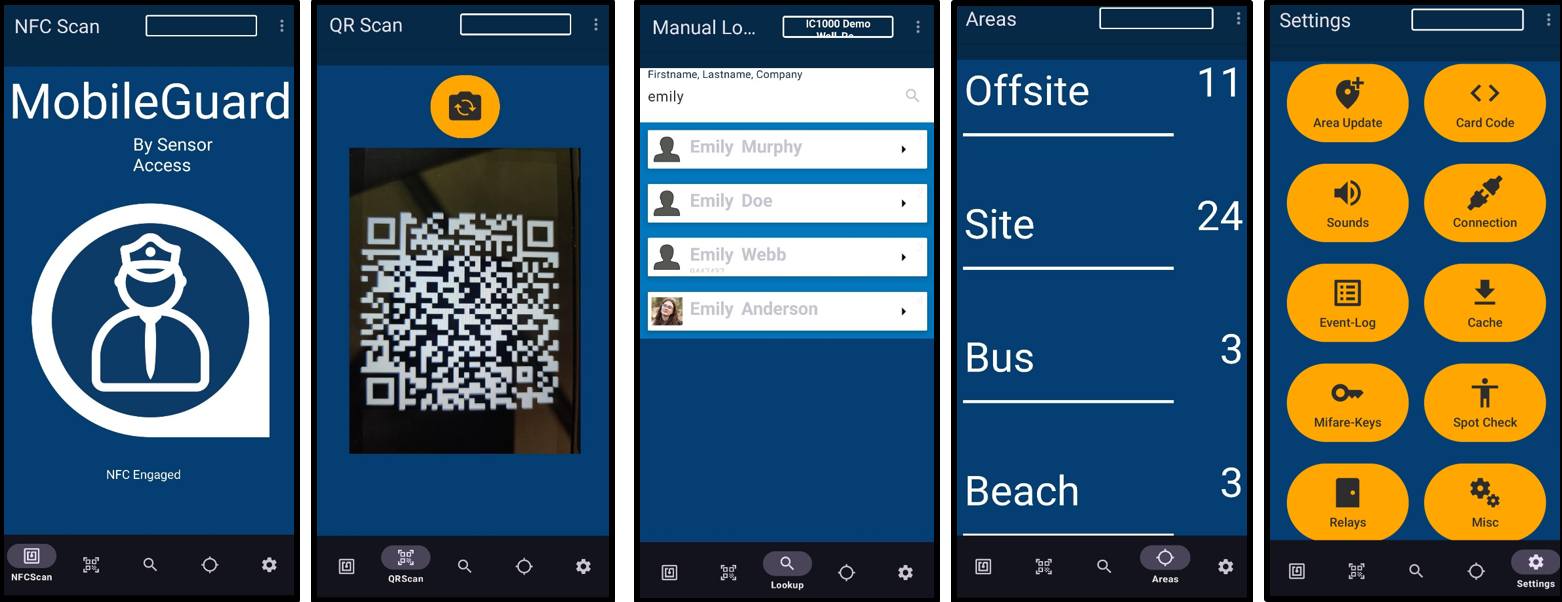
- Mobile QR Code and MIFARE Card Reading
Use an Android phone to scan and validate QR codes and MIFARE access cards while on the move. - Real-Time User Validation
Connects with GuardPoint 10 to confirm user access rights instantly. - User Photo Verification
Displays the user’s photo (if uploaded to GP10) during scanning allowing visual identity checks. - Location Verification
Shows current location details to help confirm whether a user is in the correct area. - Spot-Check Support
Enables impromptu checks of staff, visitors, or contractors.
Using Mobile Guard
Mobile Guard is currently only available on Android devices, and requires OS Android 11 or above
NFC will need to be enabled for this app to work.
Initial Setup ; Connecting to GuardPoint 10
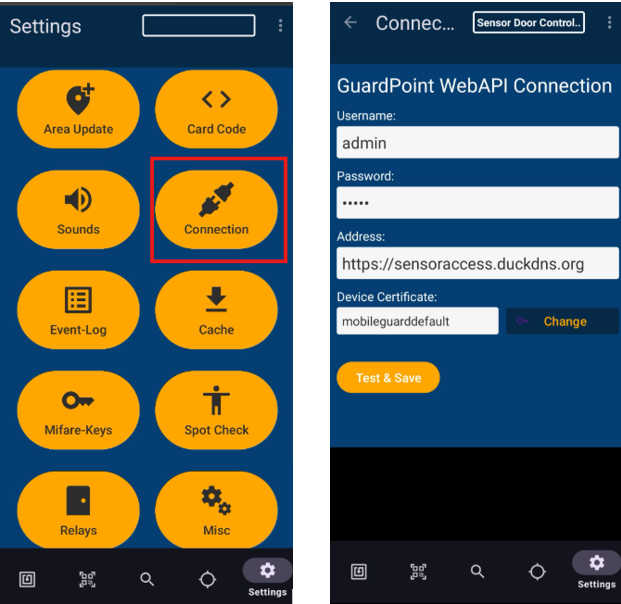
To connect to GP10, select 'Connection' within the Settings tab:
Settings
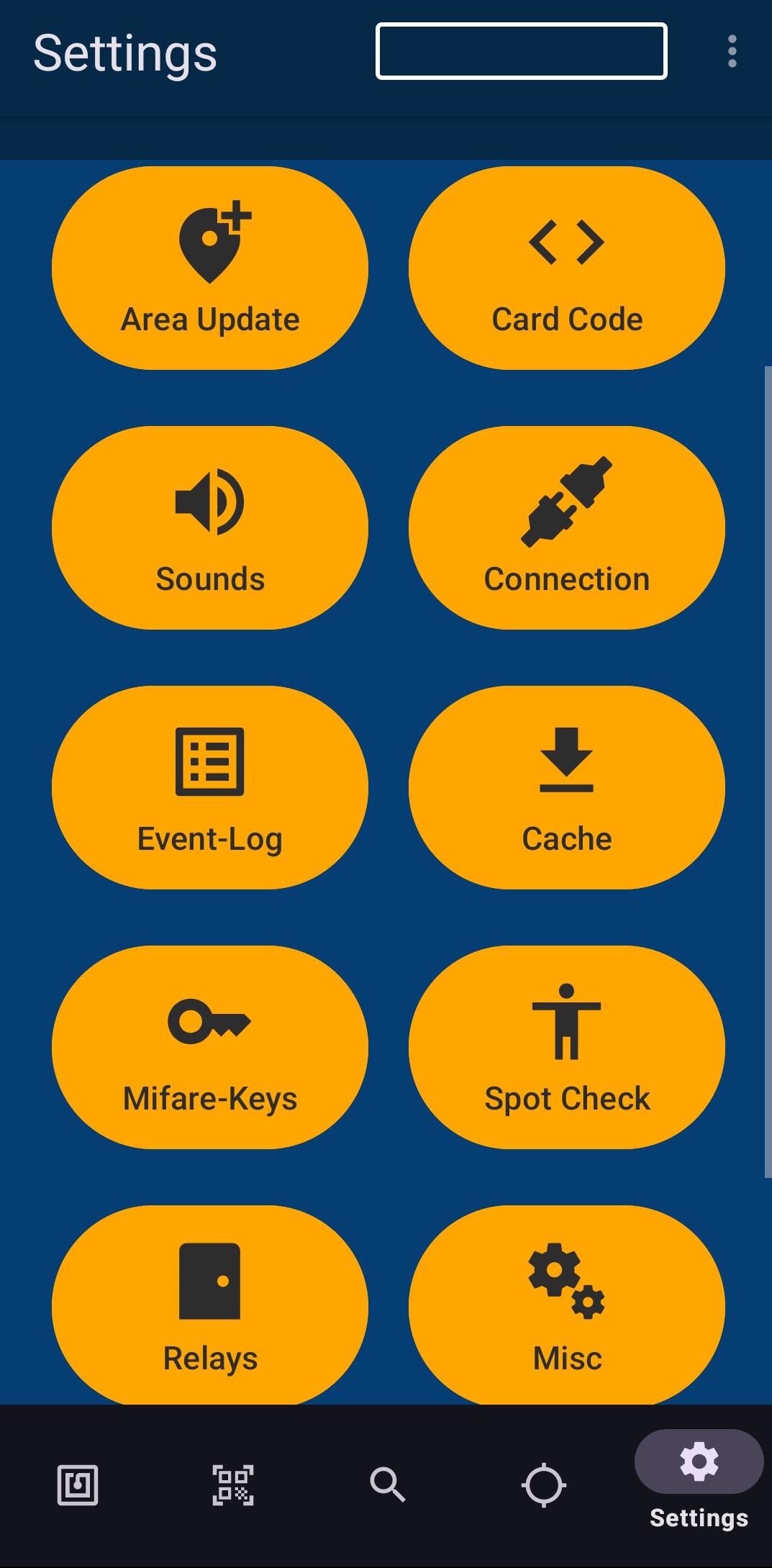
Mobile Guard has many settings allowing you to customise the app to suit you.
Click the image below to access a short video on all the setting options available within the app:
Simulating a Reader and Triggering Relays
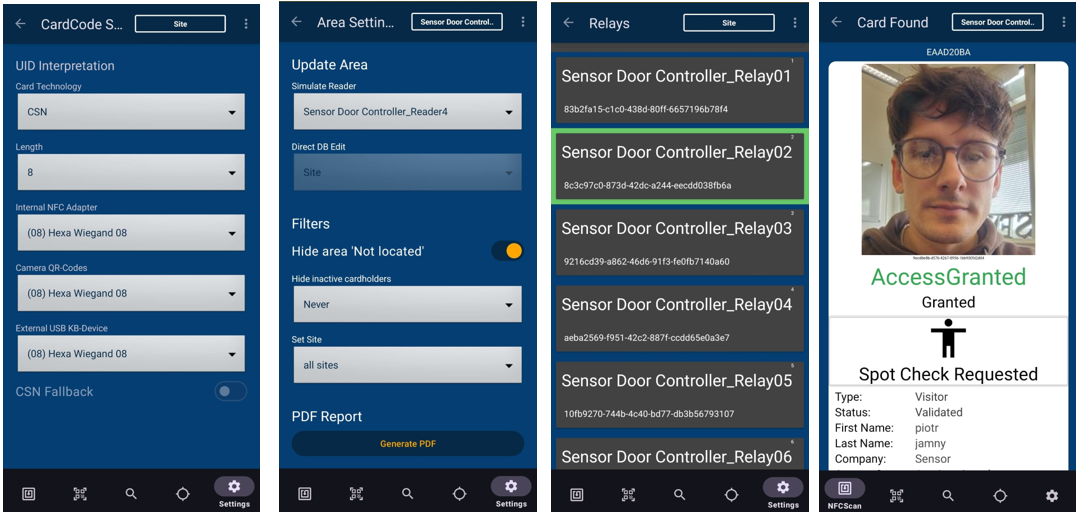
Mobile Guard can be used to simulate a reader from within the app. To do this, go to 'Settings'-> 'Area Update' and select the reader/door you want the phone to operate as.
Once selected, you can scan a cardholder through that reader using the phone. If the access is granted, Mobile Guard will trigger the associated relay, allowing the door to open as if the cardholder had presented their credentials to the physical reader.
You can also manually trigger relays from within the app by going to 'Settings' - 'Relays'. From here, select the required relay/door and press it to activate the relay and open the door.
Spot Checks
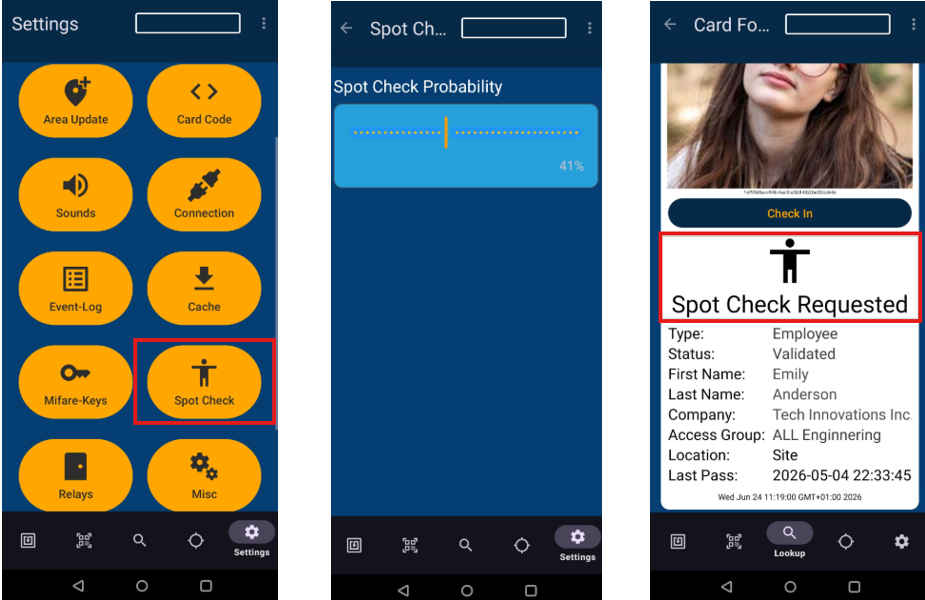
Mobile Guard includes a spot check feature which can be used to randomly prompt operators to carry out additional checks on cardholders.
The probability of a spot check can be adjusted from the app settings, allowing you to control how often these prompts appear. For example, a lower probability would mean spot checks only appear occasionally, while a higher probability would make them appear more frequently.
This can be useful for sites that need an extra level of security without checking every person manually. Spot checks can help verify that the person presenting a credential is the correct cardholder, support guard patrol procedures, and add an element of random screening at key access points or controlled areas.
The right probability setting will depend on your site’s security level and how much disruption you want to avoid.
Mobile Guard Use Case Ideas
Mobile Guard is designed for situations where a fixed access control reader is not practical, not available, or not in the right location. It gives authorised staff a portable way to check credentials, validate QR codes, confirm identities, update locations, and control selected doors or relays directly from an Android handset.
This makes the app useful across a wide range of real-life site scenarios.
Mobile access checks on the move
Security staff can use Mobile Guard while walking the site to check staff, visitors, contractors or temporary workers. By scanning a card, fob or QR code, the operator can quickly confirm whether the person is valid, whether their access has expired, and whether they are in the correct area.
This is useful for spot checks in corridors, restricted zones, plant rooms, car parks, loading bays, event spaces, accommodation blocks or any area where a fixed reader is not nearby.
Temporary or manned access points
Not every entrance needs a permanently installed reader. Mobile Guard can be used at temporary gates, event entrances, reception overflow points, construction areas, delivery doors, contractor entrances or temporary site routes.
An authorised operator can scan a person’s credential and allow access only if the user is valid. This gives the site a flexible access control point without needing additional cabling or permanent hardware.
Visitor and contractor validation
Where visitors or contractors are issued QR codes or access cards, Mobile Guard allows reception, security or site staff to validate them away from the main desk. This can be useful during busy arrival periods, large meetings, open days, deliveries, contractor works or events.
The operator can confirm the person’s identity, access status and expiry information before allowing them further into the building.
Mobile check-in and location updates
Mobile Guard can be used to update a person’s location as they move around the site. For example, a user could be checked into a building, area, coach, muster point, event zone, secure department or temporary work area.
This helps keep GuardPoint10 records more accurate, especially where people are moving through locations that do not have fixed readers installed.
Emergency roll call and mustering
During an evacuation or emergency, staff can use Mobile Guard at a muster point to scan people as they arrive. This can help build a more accurate picture of who has reached the assembly area and who may still be unaccounted for.
Because the handset is mobile, it can be used wherever the muster point is located, rather than relying only on fixed readers or printed lists.
School trips, transport and off-site movement
Mobile Guard can be used to scan pupils, staff or passengers as they board a coach, leave site, arrive at a destination, or return. This provides a simple way to record movement without relying on manual tick sheets.
The same idea can apply to any organisation managing groups of people moving between locations.
Events and hospitality areas
For venues, leisure sites, corporate events or temporary hospitality areas, Mobile Guard can be used to validate access at entrances that may only be active for a short period of time. This could include VIP areas, backstage zones, function rooms, sports facilities, temporary bars, meeting spaces or private event areas.
The app gives staff a flexible way to control access without needing to change the permanent access control layout.
Car park, barrier and gate support
Mobile Guard can assist with exceptions at vehicle gates or barriers. If a visitor arrives without the expected credential, a contractor needs temporary entry, or a user’s normal access method is unavailable, a guard can validate the person and trigger the relevant relay if authorised.
This gives the site a controlled backup process without simply leaving a gate or barrier open.
Remote areas and poor network locations
Some sites include areas where network connectivity may be limited or unreliable, such as basements, plant rooms, car parks, perimeter gates or temporary outdoor zones.
Mobile Guard is designed to continue operating in these conditions by maintaining a local copy of relevant GuardPoint10 cardholder records on the handset. This allows authorised operators to continue carrying out credential checks even if the connection to the GuardPoint10 server is temporarily unavailable.
Where live connectivity is lost, Mobile Guard can cache scan and check-in events locally on the device. Once connectivity is restored, the app can upload the stored events back to GuardPoint10, helping ensure that the system records remain complete and that access/location activity is not lost during temporary network interruptions.
Flexible access control without extra hardware
The key benefit of Mobile Guard is flexibility. It can support fixed access control by adding a portable layer for checks, temporary entrances, event access, emergency mustering, visitor validation and location updates.
For many sites, the question is simple: where would it be useful to have an access control reader in someone’s hand?
Was this article helpful?
That’s Great!
Thank you for your feedback
Sorry! We couldn't be helpful
Thank you for your feedback
Feedback sent
We appreciate your effort and will try to fix the article