GuardPoint10 API Center General Description
Introduction
The RESTful API uses HTTP requests to GET, PUT, POST, and DELETE data.
This document is intended for developers.
If you have any suggestions or requirements, please send them to support@sensoraccess.co.uk
General
GuardPoint10 introduces a RESTful API based on the ODATA protocol to retrieve information from GuardPoint10 and create actions within its access control system.
The API is divided into the following sections:
Management: Includes management resources such as Cardholders, Badges, etc.
Access control: Includes commands related to relays, polling, controllers, initialization, etc.
Software control: Includes GUI-related actions such as open screens, log in/out, etc.
Monitoring: Includes resources for handling events received from the GuardPoint10 environment.
The API is built with .NET Core 2.1 and is hosted as a Windows service.
ODATA
The ODATA protocol provides an extensive and standardized way to consume RESTful, queryable APIs.
It also exposes tools for various programming languages.
Learn more about ODATA here
Push Events (SignalR)
Events from GuardPoint10 are pushed to API clients through SignalR, an open-source technology led by Microsoft.
SignalR clients exist across major platforms and languages.
More information can be found here
Postman
5.1 Introduction
To simplify integration, we provide a Postman collection containing examples and tests.
This serves as the main API documentation resource.
Postman is a free tool for managing RESTful API calls and can also act as a testing tool.
Download Postman and tutorials here
In Postman, set the environment to dotnet runner so that requests are posted correctly to the API service.
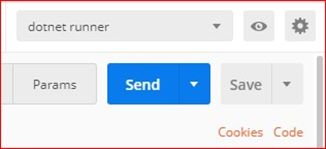
5.2 Environment Variables for Testing
Environment variables make testing the API faster and easier.
After fetching entities (via GET), their UIDs are stored as environment variables (e.g. {{cardholderUID}}).
These variables are automatically used in subsequent requests.
You can edit or add new variables as needed.
View and edit them from the top right of the Postman window.
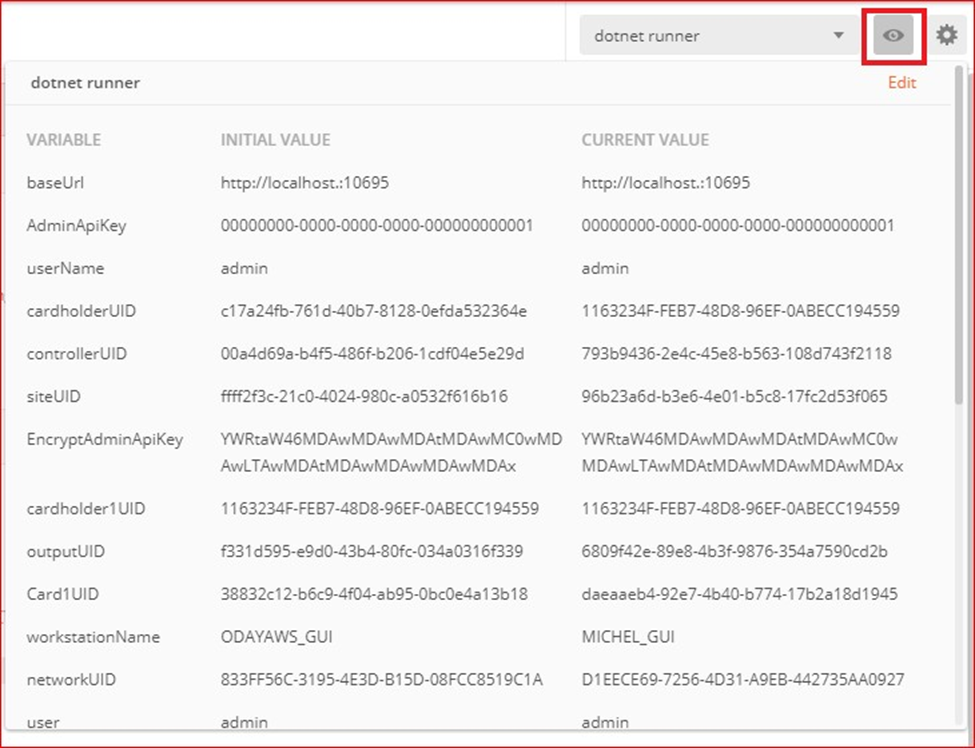
Start Working with the API
The API Center communicates with GuardPoint10 through the AcsServer.
Ensure that the following services are running:
AcsServer
AcsNmService
AcsApiServer
You can open the GuardPoint10 GUI for feedback, but it’s not required for the API to function.
As long as these services are active, the API can communicate with your system.
We provide:
A Postman collection of demo URLs
A Visual Studio solution that demonstrates using the API in .NET
API Key vs UID
| Type | Description |
|---|---|
| API Key | A user-controlled string that can be added in the GuardPoint10 Users screen. Used for specific main resources (e.g., controllers, relays). It can also be used to filter resources. |
| UID | A unique identifier (GUID) for every resource instance (e.g., cardholders, badges). A UID can be used everywhere. |
Authentication and Authorization
All API call headers must include:
Authorization: [username + user-specific API key]
The user must be authorized in GuardPoint10 to use the API.
Setup Steps
Open the Users Screen in GuardPoint10.
Select the user (e.g., admin).
Set Allow API = Yes.
Generate or enter a unique GUID, e.g. 00000000-0000-0000-0000-000000000001 (do not use 00000000-0000-0000-0000-000000000000).
Save.
In Postman, open Environment Quick Look (top right).
Set:
ApiAdminKeyto the GUID createdUserto the same value as the username in GuardPoint10
Translation (Multilanguage)
The API responses are in English by default and include error codes for translation.
Controller type names are also in English.
HTTP Status Codes
The API uses standard HTTP status code conventions, as shown here.
Available Operations
REST API (ODATA)
| Resource | GET All | GET by UID | API Key | Description |
|---|---|---|---|---|
| Controllers | ✓ | ✓ | ✓ | Includes controller data: communication status, FW/HW version, address, etc. |
| Site | ✓ | ✓ | Includes polling status, baud rate, etc. | |
| Inputs | ✓ | ✓ | ✓ | Includes physical/logical status, 4 states, is armed, etc. |
| Alarm Zones | ✓ | ✓ | Includes alarm status. | |
| Readers | ✓ | ✓ | ✓ | Includes door contacts, last event details. |
| Outputs (Relays) | ✓ | ✓ | ✓ | Includes relay activation status and constant states. |
| Cardholders | ✓ | ✓ | Includes personal details, last access, connected cards, etc. | |
| Cards | ✓ | ✓ | Includes card status, card type, attached cardholder. | |
| Security Groups | ✓ | |||
| Areas | ✓ | |||
| Departments | ✓ | ✓ | ||
| Workstations | ✓ | Displays names of existing workstations. | ||
| Events (access, alarms, comm, technical, etc.) | ✓ | Provides event log data. |
PATCH (by UID)
| Resource | Patch | Description |
|---|---|---|
| Cardholder | ✓ | Update personal details, Security group, Department, Area, etc. |
| Card | ✓ | Change status, attach cardholder. |
DELETE (by UID)
| Resource | Delete | Description |
|---|---|---|
| Cardholder | ✓ | Delete or archive. |
| Card | ✓ |
POST (All/Many or by UID)
| Resource | Post | API Key | Description |
|---|---|---|---|
| Card | ✓ | Create new card. | |
| Cardholder | ✓ | Create new cardholder with personal details and attached cards. | |
| Controller – Initialize | ✓ | ✓ | |
| Site – Start/Stop Polling | ✓ | ||
| Inputs – Acknowledge/Confirm | ✓ | ✓ | |
| Alarm Zones – Arm/Disarm/Return to Weekly Program | ✓ | ||
| Outputs – Activate/Deactivate/Return to Normal/Activate All Doors | ✓ | ✓ | Can activate with time period. |
| Workstations – Close/Logout/Login/Bring to Front/Display Message/Play Sound/Log to Events | ✓ | ||
| Activate Manual Events | ✓ | ✓ | Triggers manual event and associated reflex actions. |
SignalR
| Event Type | Subscribe | Description |
|---|---|---|
| Access Events | ✓ | |
| Alarms Events | ✓ | |
| Audit Events | ✓ | |
| Comm Events | ✓ | |
| General Events | ✓ | |
| Technical Events | ✓ | |
| User Manual Events | ✓ |
Troubleshooting
Response 401 – Not Authorized:
Verify that:
User credentials match between GuardPoint10 and API
The user has Allow API enabled
Was this article helpful?
That’s Great!
Thank you for your feedback
Sorry! We couldn't be helpful
Thank you for your feedback
Feedback sent
We appreciate your effort and will try to fix the article